How it works For Doctors For Front Desk Security Patient Login Clinic Login Book a demo
For Doctors

Stop re-taking history. Stop writing everything by hand.

In a 2–7 minute consult, you don't have time to skim a stack of old papers or scribble diagnosis, medicines and notes onto one sheet. Prescr gives you the patient's full history instantly and turns what you say into a clean prescription.

The daily reality

The parts of the day that steal your time.

The pain

The patient hands you a bag of old prescriptions and you spend precious seconds skimming them.

With Prescr

A Highlights card shows active diagnoses, current meds, last plan and pending follow-ups, before you look up.

The pain

A returning regular you last saw a year ago, and you're re-taking their whole history again.

With Prescr

Their full record is one tap away; you pick up exactly where you left off.

The pain

Diagnosis, medicines and advice all jammed onto one handwritten sheet: hard to read, easy to lose.

With Prescr

Clean, separate fields for diagnosis, medicines and advice: legible, structured, and saved forever.

The whole screen

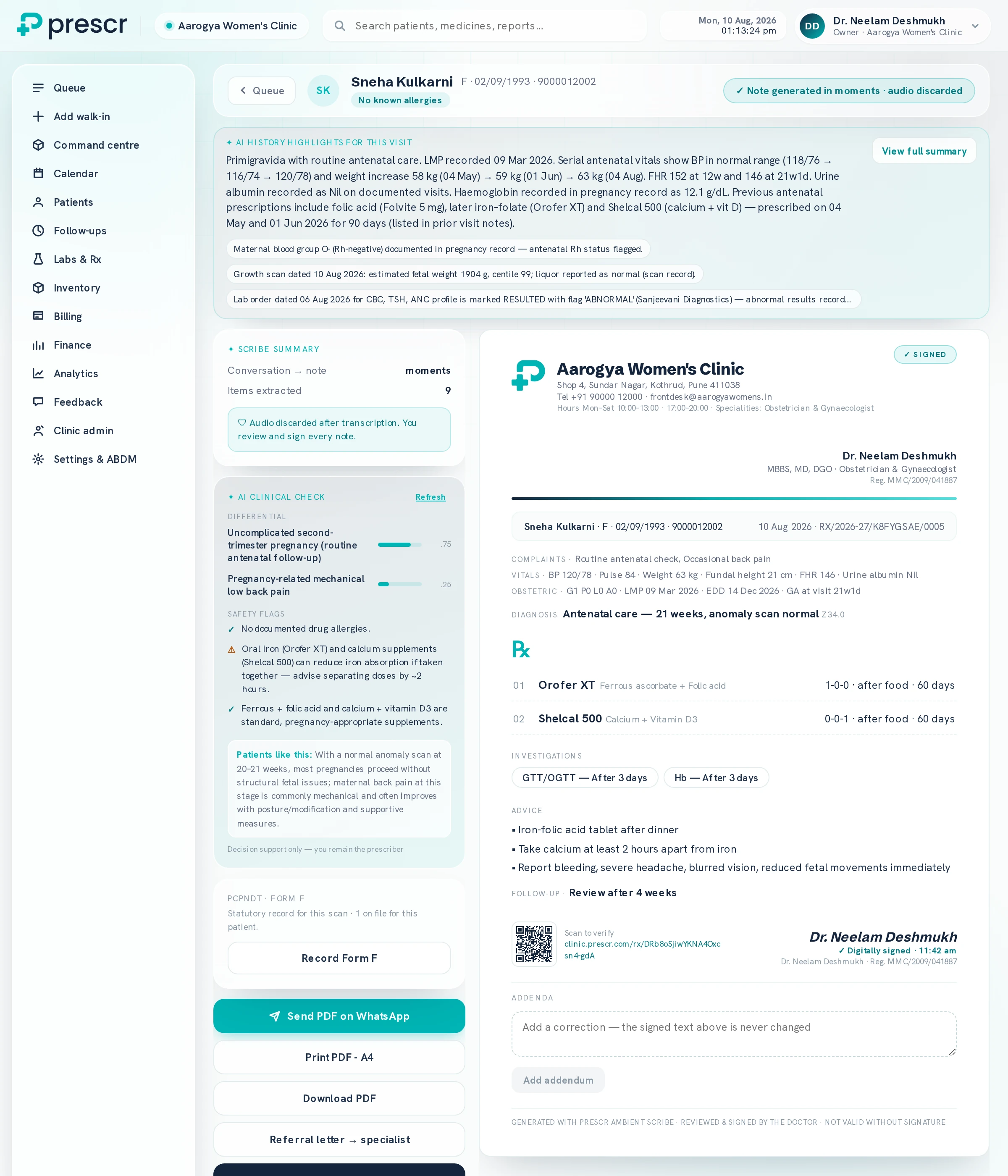
This is your screen during a consult.

Not a stitched-together mock-up. One screen holds the patient's history, what the scribe heard, a clinical second opinion, and the prescription you are about to sign — so you are not hunting through tabs while somebody waits.
prescr · clinic · consultation
The full Prescr consultation screen for a 22-week antenatal visit. A left rail lists the clinic's sections. Across the top, an AI history summary of the pregnancy so far — serial blood pressures, weight gain, fetal heart rates and previous prescriptions — with flags for the mother's Rh-negative status, the latest growth scan and an abnormal lab result. Below left, a scribe summary reporting nine items extracted with the audio discarded, then an AI clinical check listing a differential with confidence scores and safety flags. Below right, the signed prescription on the clinic letterhead with complaints, vitals, obstetric summary, diagnosis and ICD code, medicines, investigations, advice, follow-up, a verification QR and the doctor's digital signature.

Swipe to see the whole screen

Every panel here was filled by the consultation itself. The history summary is read off past visits, the note off what was said, and the prescription off the note — your job is to check it and sign. The clinical check offers a differential and flags that calcium blocks iron absorption, and says outright that it is decision support: you remain the prescriber. Demonstration clinic · sample patient
Instant patient history

Full context before you say a word.

Open your day and the Highlights card is already there: who is next, why they are coming, and the conditions to keep in mind — no skimming a bag of old papers while the patient waits.

It states plainly that it was generated from the records on file and asks you to confirm with the patient. A head start, not a diagnosis.

See patient records & Highlights
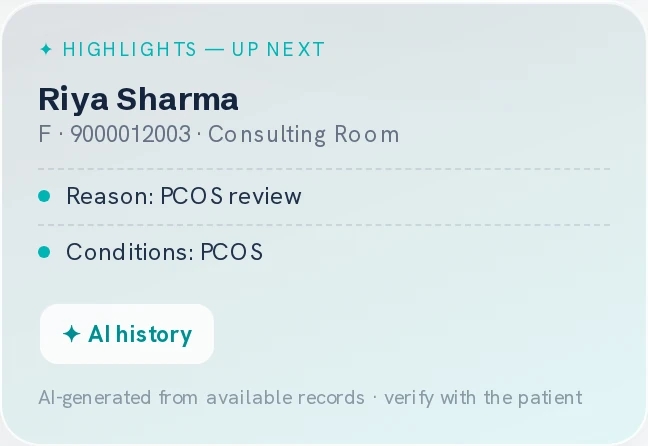
The Highlights card from the Prescr command centre, headed 'Highlights — up next': the patient's name, sex and consulting room, her reason for visit, her known conditions, a button to open her AI history, and a line noting the summary is AI-generated from available records and should be verified with the patient.
The card as it sits beside the day's schedule, at its real size. Demonstration clinic · sample patient
Ambient multilingual scribe

Speak the way you already speak.

Hindi, English, Hinglish or regional code-mixing, Prescr is built for how Indian doctors actually talk in a busy OPD. It drafts a structured prescription and SOAP note in under 60 seconds, ready for you to review and sign.

  • Built for code-mixed speech

    Not a Western tool bolted onto Indian accents.

  • You review & sign

    Nothing goes to the patient until you approve it.

See how the scribe works
prescr · consult → Rx
You"BP thoda high hai aaj, 150/95. Telmisartan 40 continue karo, aur salt kam karne ko bolo…"
DxHypertension, sub-optimally controlled
RxTab Telmisartan 40mg, 1 OD (continue)
AdvReduce salt · home BP monitoring · review 2 weeks
It knows your specialty

Not a generic notes app with your name on it.

A gynaecologist tracking a pregnancy needs different screens from a physician managing diabetes. Prescr builds the chart your specialty actually keeps — here, an antenatal card that turns nine months of visits into curves you can read mid-consult.
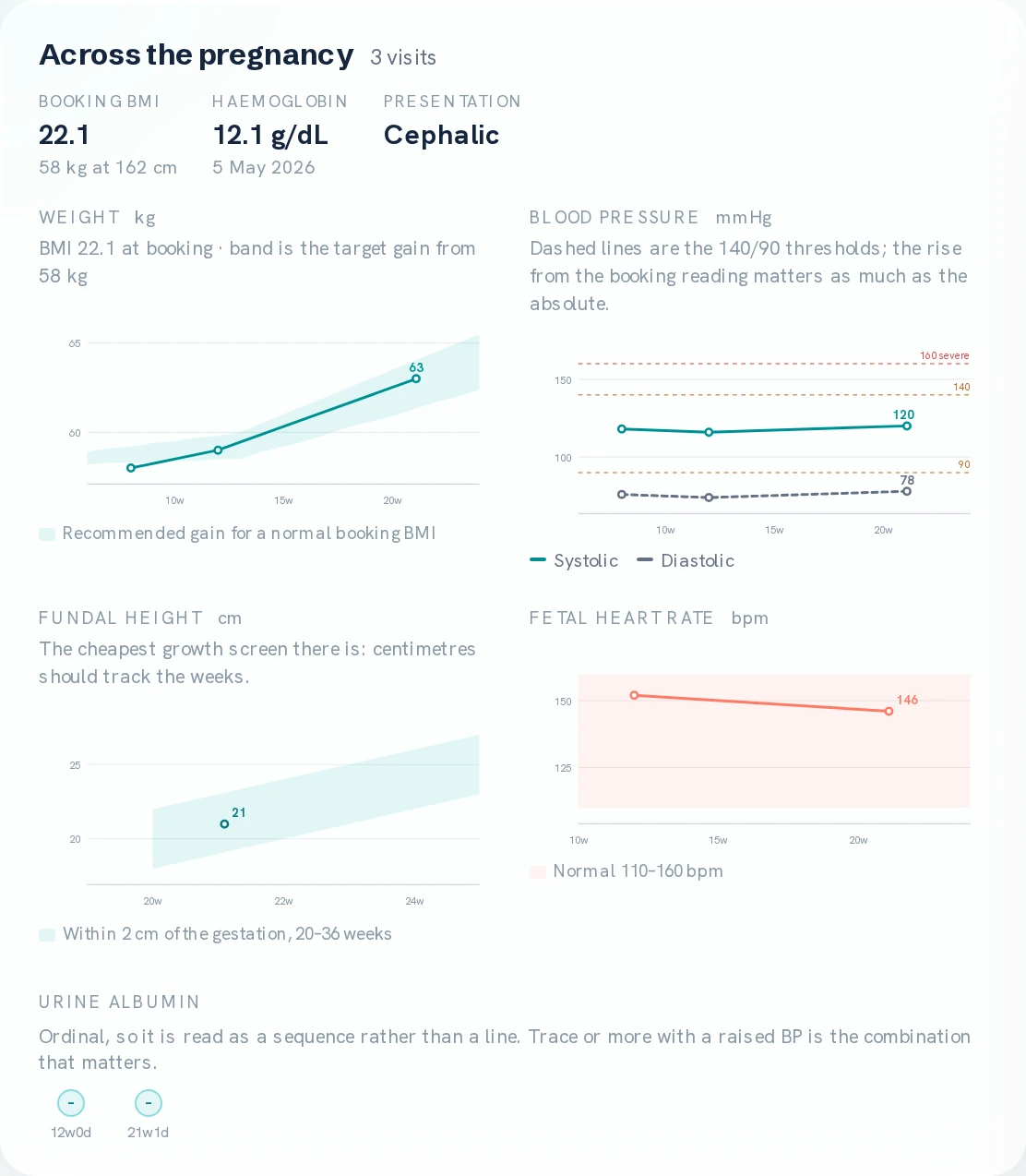
The 'Across the pregnancy' card from a Prescr antenatal record: booking BMI, haemoglobin and fetal presentation, then four charts — weight against the recommended gain band for her booking BMI, blood pressure against the 140/90 thresholds, fundal height against gestation, and fetal heart rate against the normal range — plus urine albumin as a sequence of readings.
Four charts, drawn from visits already recorded. Weight sits inside the gain band calculated from her booking BMI, blood pressure against the 140/90 lines, and fundal height against the weeks — the cheapest growth screen there is. Nobody typed a chart; three ordinary antenatal visits produced this. Demonstration clinic · sample patient

Structured, readable output

Diagnosis, medicines and advice in clean, separate fields, never a mixed scribble.

Works wherever you practise

Your hospital cabin and your home clinic, on your phone: one login, everything synced. More →

Saves time from patient #1

Near-zero learning curve. It works like your paper, just connected, so there's nothing to "learn".

Your own Rx pad, by specialisation

Prescription templates tuned to your specialty, so your common diagnoses and go-to medicines are a tap away, whether you dictate or type.

Get your time back, starting with your next patient.

Book a walkthrough and see the clinic OS on your own consultation flow. We set it up with you personally.